
اكتب رسالتك… ودع التوثيق لورّاقWrite your thesis. The citations write themselves.
ورّاق محرّر نصوص عربي صُمّم للباحثين والطلبة: يكتب الحواشي و«المرجع نفسه» تلقائياً، ويضبط النص العربي والإنجليزي في السطر الواحد، ويُدرج الآيات بالرسم العثماني، ثم يحوّل رسالتك بنقرة واحدة إلى PDF وWord وعرض تقديمي للمناقشة.Warraq is an Arabic-first editor for researchers and students: automatic footnotes and “Ibid.”, Arabic and English in the same line without mess, Quran verses in Uthmani script, and one click from your thesis to PDF, Word and defense slides.
لماذا ورّاق؟Why Warraq?
صُمّمت برامج تحرير النصوص للجميع، أما ورّاق فصُمّم للباحث العربي خاصة.Word was made for everyone. Warraq was made for the Arab researcher.
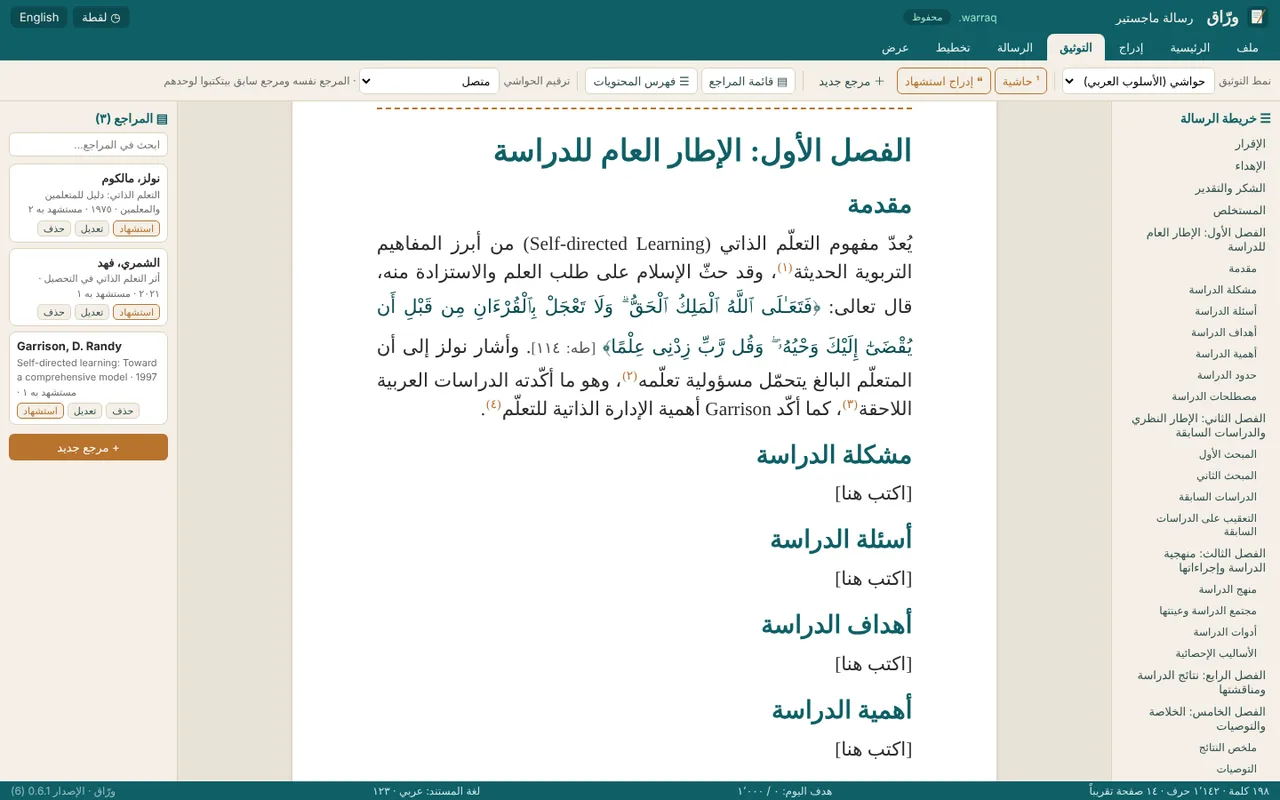
التوثيق يكتب نفسهCitations write themselves
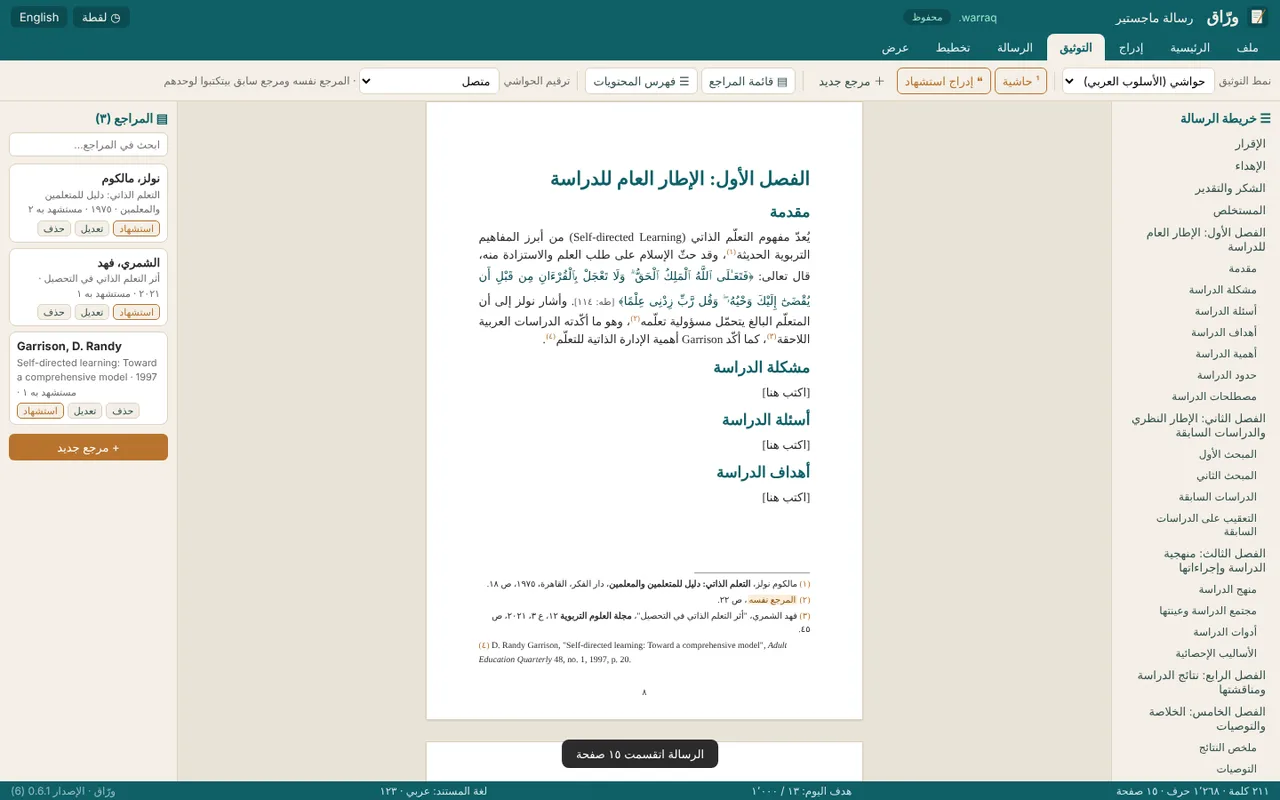
استشهد بالمرجع مرة واحدة، فيكتب ورّاق الحاشية كاملة، ثم يكتب المرجع نفسه و«مرجع سابق» تلقائياً، ويرتّب قائمة المراجع بنفسه: العربية أولاً ثم الأجنبية.Cite once and Warraq writes the full note, then Ibid. and “op. cit.” by itself. The bibliography sorts itself too.
نص عربي سليمArabic done right
تأخذ كل فقرة اتجاهها الصحيح تلقائياً، وتبقى الأقواس والأرقام في مواضعها في السطر الذي يجمع العربية والإنجليزية، ويمكنك اختيار الأرقام (١٢٣) أو (123) للرسالة كلها.Each paragraph sets its own direction, brackets and numbers stay in place in mixed lines, and you choose ١٢٣ or 123 for the whole document.
من الرسالة إلى عرض المناقشةFrom thesis to defense
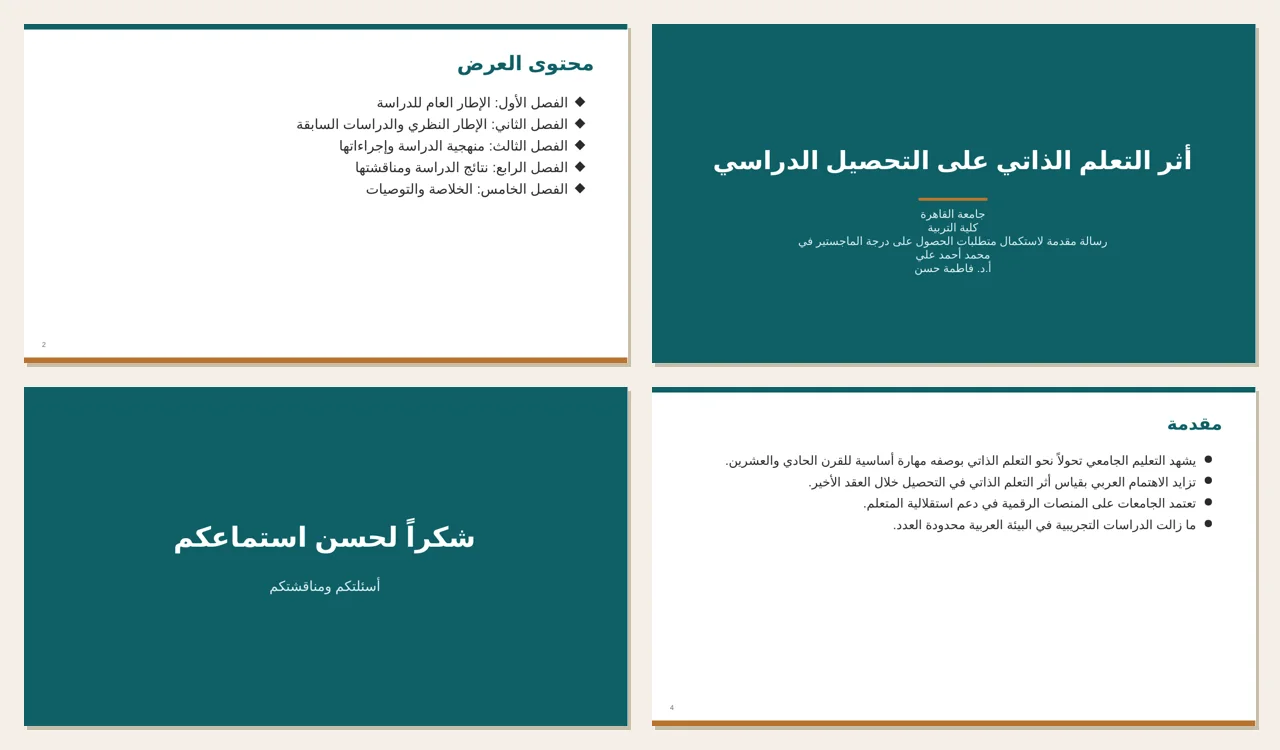
يحوّل ورّاق رسالتك إلى عرض PowerPoint من اليمين إلى اليسار: شريحة لكل فصل، وأهم النقاط، والجداول، والمراجع، مع ملاحظات المتحدث.Turn your thesis into a right-to-left PowerPoint: a slide per chapter, key points, tables, references and speaker notes.
كل ما يحتاجه الباحثEverything a researcher needs
مجاني، دون اشتراك، وملفاتك تبقى على جهازك.Free, no subscription, and your files stay on your device.
الآيات بالرسم العثمانيQuran verses, Uthmani script
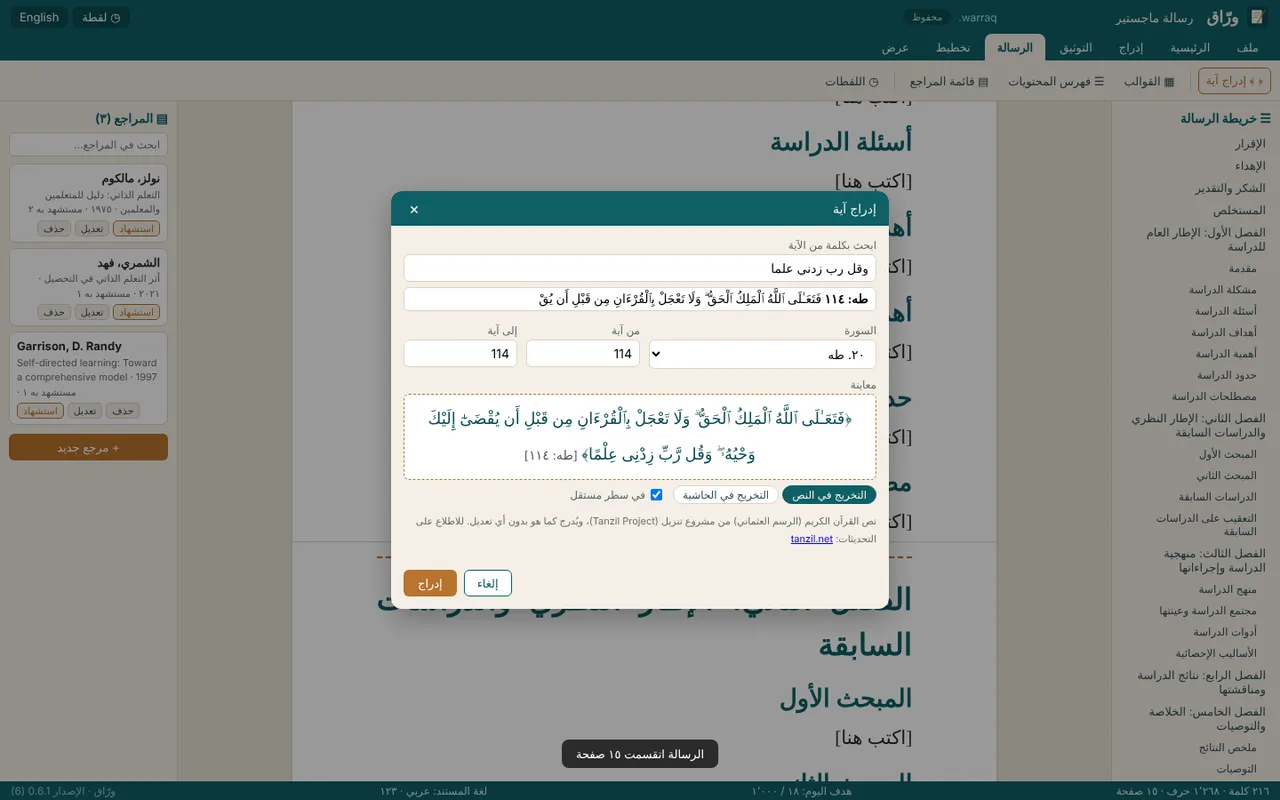
ابحث بكلمة من الآية دون تشكيل، فتُدرج الآية بنصّها الموثّق مع تخريجها [السورة: الآية]، وتبقى محمية من التعديل.Search a word without diacritics; the verified verse comes with its reference and is protected from edits.
ثلاثة أنماط للتوثيق3 citation styles
الحواشي بالأسلوب العربي، وAPA، وVancouver، مع إمكانية تحويل الرسالة كلها من نمط إلى آخر بنقرة واحدة.Arabic footnote style, APA and Vancouver. Switch the whole thesis with one click.
قوالب جاهزة للرسائلThesis templates
رسالة ماجستير، ورسالة دكتوراه، وبحث محكّم، ورسالة باللغة الإنجليزية، جميعها مجهّزة بالفصول والفهرس وقائمة المراجع.Master’s, PhD, journal paper and English thesis, ready with chapters, contents and references.
يفتح ملفات WordOpens your Word files
يفتح ملفات .docx بتنسيقها وجداولها وحواشيها، وكذلك ملفات .doc القديمة، ويكتشف العناوين تلقائياً إذا كتبت الرسالة دون أنماط العناوين..docx with formatting, tables and footnotes, even old .doc files, and it detects headings when none were set.
PDF وWord والطباعةPDF, Word and print
صفحات حقيقية تظهر الحواشي في أسفل كل منها، وفهرس بأرقام صفحات صحيحة، مع التصدير إلى PDF نصّي، أو إلى Word بحواشي Word أصلية.Real pages with footnotes at the bottom and an accurate contents page. Export text PDF or Word with native footnotes.
تحويل الرسالة إلى عرض PowerPointThesis to PowerPoint
يصنع ورّاق عرض المناقشة من رسالتك مباشرة، بشرائح عربية من اليمين إلى اليسار جاهزة للتعديل في PowerPoint.Warraq builds your defense deck from the thesis itself, right-to-left Arabic slides ready to edit in PowerPoint.
العربية والإنجليزية والفرنسية قريباً جداًArabic and English French very soon
اكتب رسالتك بالعربية أو بالإنجليزية، ويضبط ورّاق الاتجاه ومصطلحات التوثيق (المرجع نفسه / Ibid.) تلقائياً. ودعم الفرنسية الكامل قريباً جداً.Write in Arabic or English; Warraq handles direction and citation terms (Ibid.) for you. Full French support is coming very soon.
لقطات وحفظ تلقائيSnapshots and autosave
عُد إلى نسخة الأمس بنقرة واحدة؛ إذ يلتقط ورّاق لقطة تلقائية قبل كل تغيير كبير حتى لا يضيع عملك.Go back to yesterday’s version in one click; Warraq snapshots before every big change.
ملفاتك ملككYour files are yours
تُحفظ رسالتك في ملف .warraq على جهازك، ولا تُرفع إلى أي خادم، ويعمل البرنامج دون اتصال بالإنترنت.Your thesis is saved as a .warraq file on your device, never uploaded. Works offline.
من رسالتك إلى عرض المناقشة بنقرة واحدةFrom your thesis to your defense deck in one click
بدلاً من قضاء أيام في إعداد عرض المناقشة، يقرأ ورّاق هيكل رسالتك ويصنع منه عرض PowerPoint عربياً جاهزاً للتعديل.Instead of spending days on your defense slides, Warraq reads the structure of your thesis and builds an editable Arabic PowerPoint deck.
- شريحة العنوان: عنوان الرسالة والجامعة واسم الباحث والمشرف.Title slide: thesis title, university, researcher and supervisor.
- شريحة «محتوى العرض» بفصول الرسالة.An outline slide listing the chapters.
- شريحة لكل فصل ولكل مبحث بأهم النقاط.A slide per chapter and section with the key points.
- شرائح الجداول والصور، ثم أهم المراجع.Table and figure slides, then key references.
- ملاحظات المتحدث: نص المبحث كاملاً تحت كل شريحة.Speaker notes: the full section text under each slide.
ورّاق من الداخلSee Warraq in action
صور حقيقية من البرنامج.Real screenshots from the app.
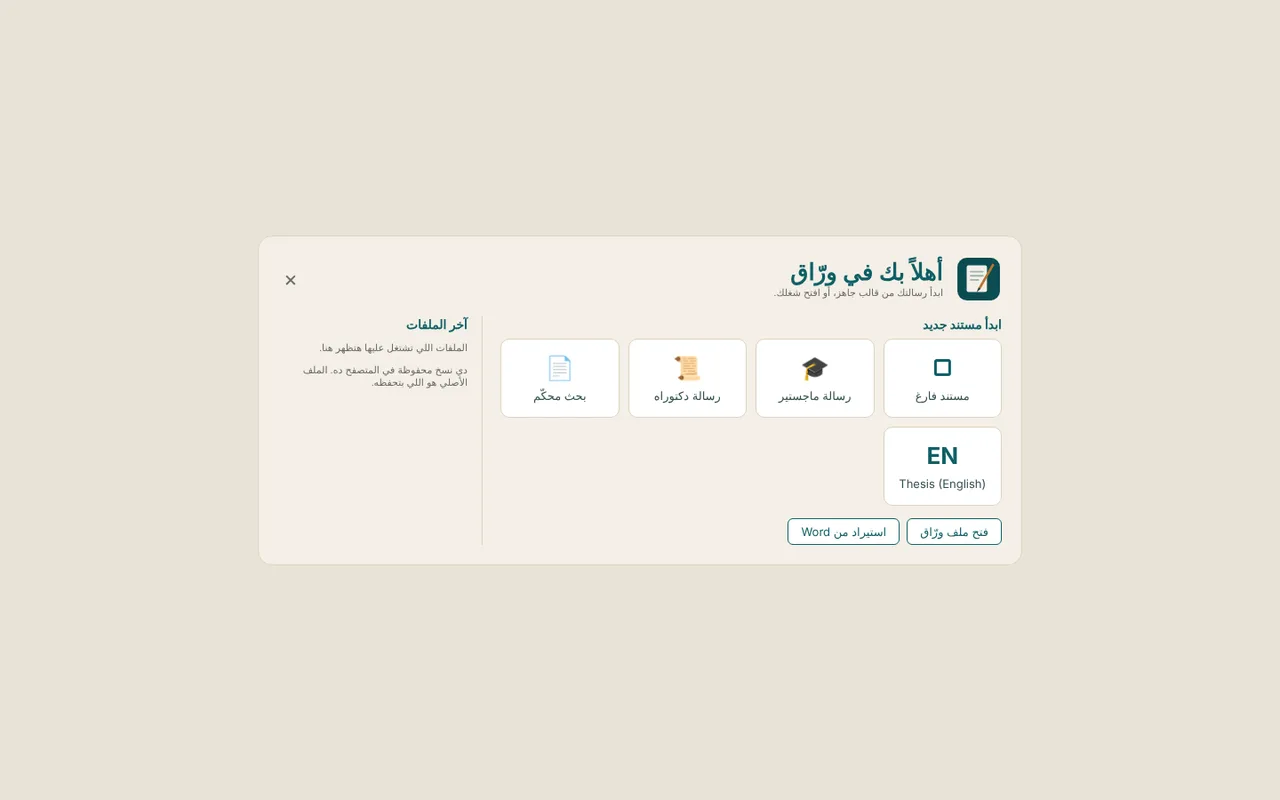
حمّل ورّاق مجاناًGet Warraq for free
هذه نسخة تجريبية، وملاحظاتك تصنع الفرق.This is a beta. Your feedback shapes it.
Windows
ويندوز ١٠ و١١ (٦٤ بت) · نحو ٨٠ ميجابايتWindows 10 and 11 (64-bit) · about 80 MB
حمّل لويندوزDownload for WindowsmacOS
قريباً بإذن اللهComing soon
- انقر «مزيد من المعلومات» (More info).Click “More info”.
- ثم انقر «تشغيل على أي حال» (Run anyway).Then “Run anyway”.
توقيع الكود مجاني، تقدّمه SignPath.io، والشهادة صادرة عن SignPath Foundation.Free code signing provided by SignPath.io, certificate by SignPath Foundation. · سياسة توقيع الكود (Code signing policy)Code signing policy
أسئلة شائعةQuestions
هل ورّاق مجاني؟Is Warraq free?
نعم. النسخة الحالية مجانية بالكامل، وستبقى المزايا الأساسية مجانية دائماً، وقد تُضاف لاحقاً مزايا متقدمة اختيارية مدفوعة.Yes. The current version is completely free and the core will always be free. Optional advanced features may come later.
هل تُرفع ملفاتي إلى الإنترنت؟Are my files uploaded anywhere?
لا. يُحفظ ملفك على جهازك بصيغة .warraq، ويعمل البرنامج دون اتصال بالإنترنت.No. Your file is saved on your device as .warraq, and the app works offline.
جامعتي تطلب ملف Word أو PDF، فهل يمكن ذلك؟My university wants Word or PDF. Can I?
نعم. يصدّر ورّاق ملف Word (.docx) بحواشي Word أصلية وفهرس Word، وملف PDF بصفحات منسّقة، كما يفتح ملفات Word الموجودة لديك.Yes. Warraq exports Word (.docx) with native footnotes and contents, and PDF with proper pages. It also opens your existing Word files.
هل يدعم ورّاق اللغة الفرنسية؟Does Warraq support French?
يدعم ورّاق حالياً العربية والإنجليزية، أما الدعم الكامل للفرنسية (الواجهة والتوثيق) فقريب جداً بإذن الله.Warraq currently supports Arabic and English. Full French support (interface and citations) is coming very soon.
من أين نص القرآن الكريم؟Where does the Quran text come from?
من مشروع تنزيل (Tanzil) بالرسم العثماني، ويُدرج كما هو حرفياً دون أي تعديل، ويتحقق ورّاق من نص الآيات مقارنة بالمصدر في كل مرة يُفتح فيها الملف.From the Tanzil Project (Uthmani script), inserted verbatim, and re-verified against the source every time a file opens.
ما التحذير الأزرق الذي يظهر عند التثبيت؟Why the blue warning when installing?
يعرضه ويندوز لأي برنامج جديد لم يُوقَّع رقمياً بعد. انقر «مزيد من المعلومات» ثم «تشغيل على أي حال». وسيُوقَّع البرنامج رقمياً مع الإصدار ١٫٠.Windows shows it for new programs without a digital signature. Click “More info” then “Run anyway”. Signing comes with version 1.0.
هل توجد نسخة لأجهزة ماك؟Is there a Mac version?
قريباً بإذن الله، ويمكنك حتى ذلك الحين استخدام ورّاق في المتصفح على جهاز ماك.Coming soon. Meanwhile, use Warraq in your browser on a Mac.